kompot.ai

From bug reports to a mobile product. QA, desktop fixes in code, and a mobile version designed from scratch.

From bug reports to a mobile product. QA, desktop fixes in code, and a mobile version designed from scratch.

about the project

kompot.ai is a CRM for small service companies with AI agents built in: one place for contacts, deals, jobs, invoices, scheduling and the conversations that run through them. I joined after the core product was built — the team was complete, the desktop web app worked, release was planned.

I came in through QA to fill a product-design gap. For the first weeks I tested the whole interface end to end, desktop and mobile, and filed every finding in the team's tracker with repro steps, screenshots and expected behavior. I hold an A.S. in Computer Science and work in the codebase: part of the desktop UI issues I found, I fixed myself; the rest was fixed by the developers from my reports. The third piece was the one nobody owned: on a phone the product was the desktop layout squeezed down, so I designed a separate mobile version from scratch — a mobile redesign of the whole product, now in production. I did not design the product or its desktop version.

Pre-release build · may change. Built at DigitalVertex for a client; the product has not launched publicly yet.

Role

Product Designer · QA · UI Engineering

Team

Core team of 6 · cross-functional (product, engineering, design, data)

client

kompot.ai · DigitalVertex client

year

2026

Duration

June–July 2026

Status

Desktop and mobile in production · public launch pending
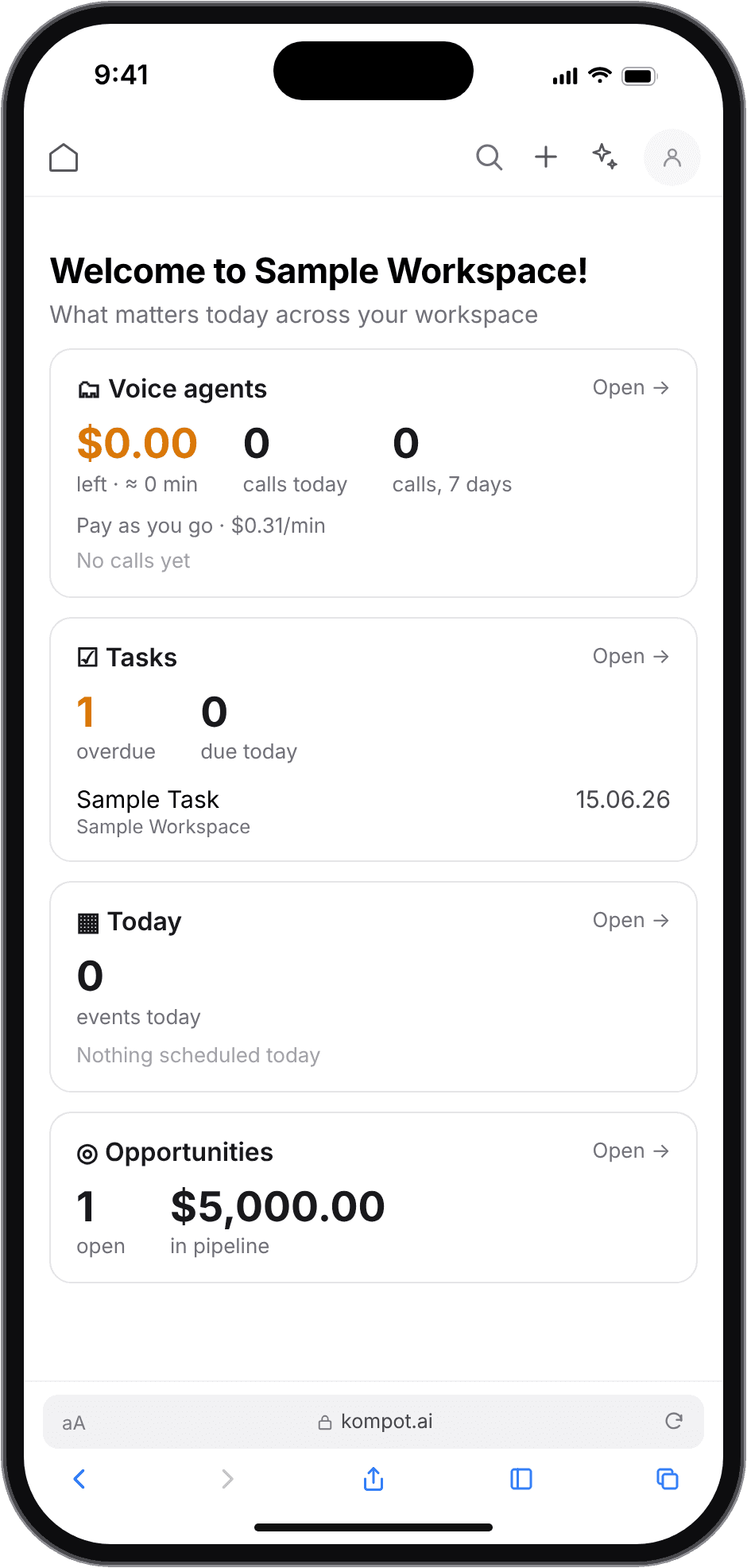
Mobile dashboard of the shipped redesign: summary cards for agents, tasks, today and opportunities
Dashboard
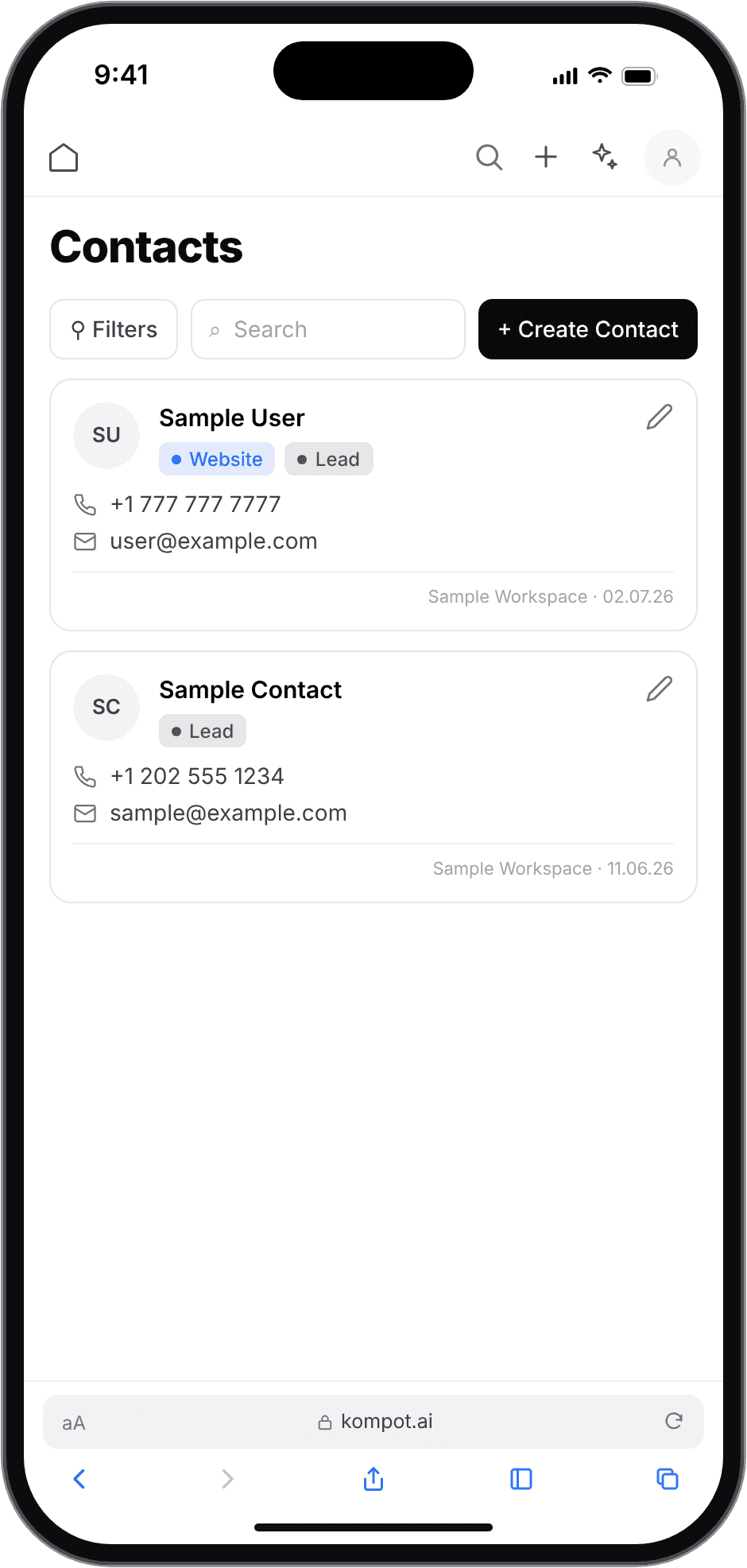
Mobile contacts list of the shipped redesign: one card per contact with tags, phone and email
Contacts
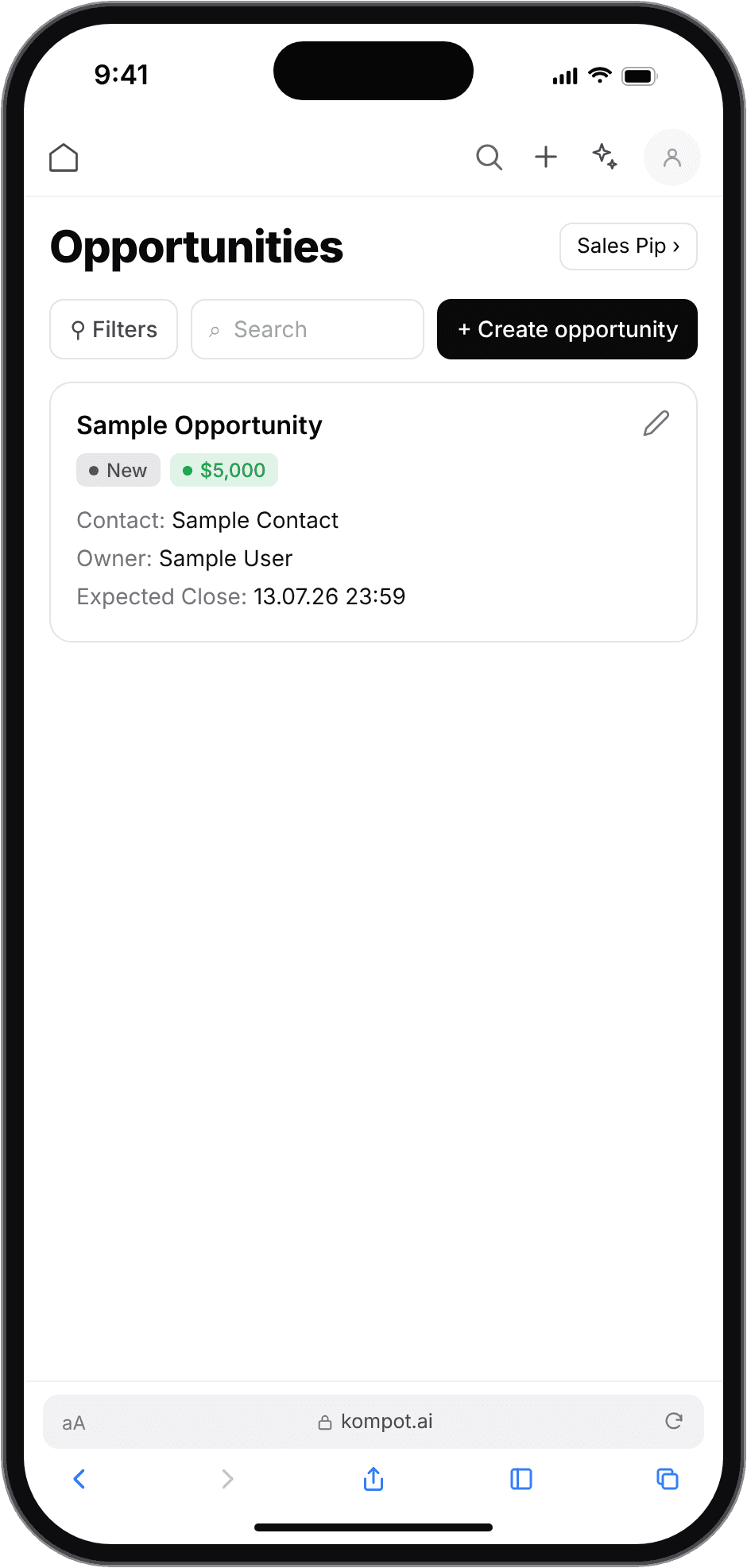
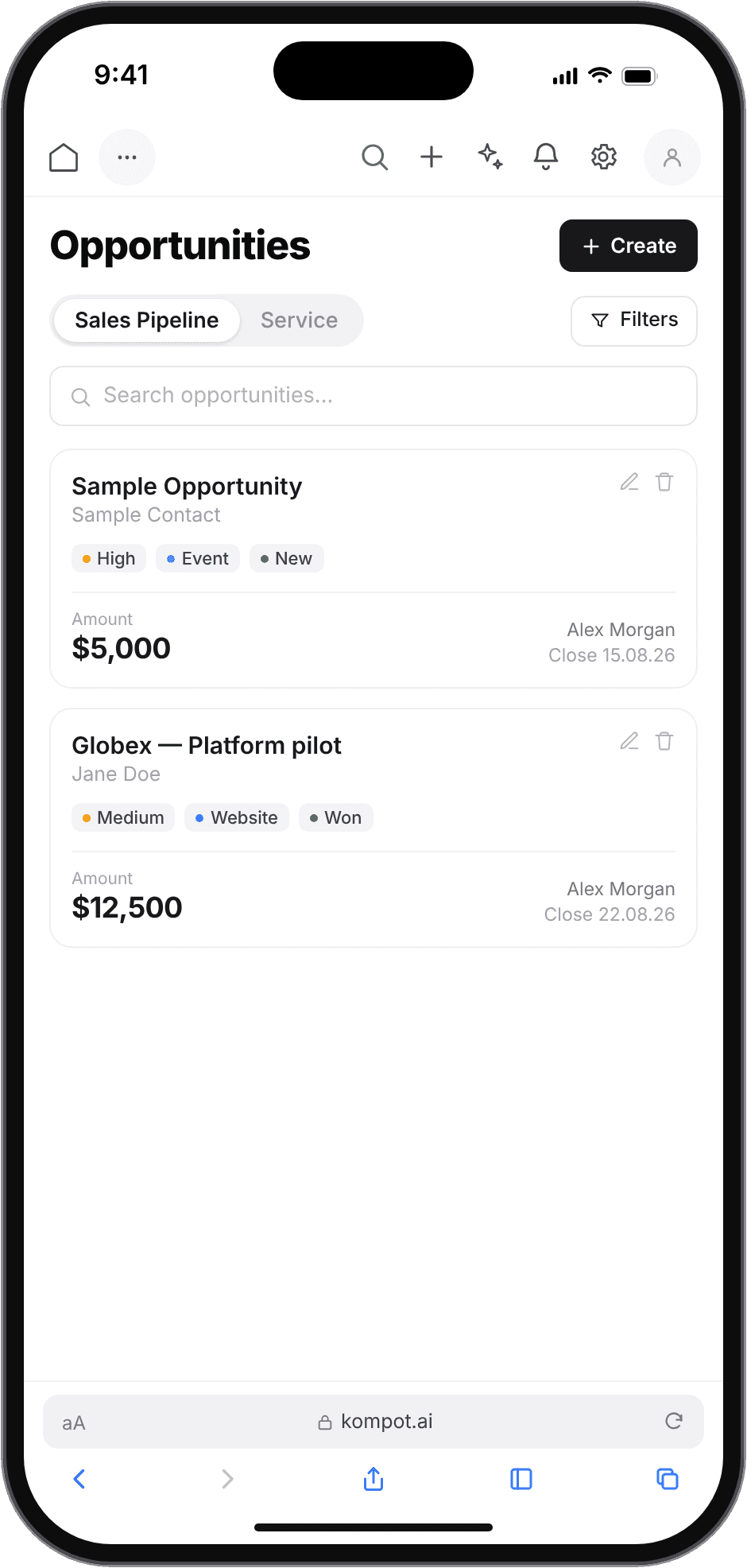
Mobile opportunities list of the shipped redesign: one card per deal with the amount first
Opportunities

Shipped mobile version · in production

Shipped mobile version · in production

process
How the work unfolded
I came in through QA to fill a product-design gap, and the order the work happened in is the argument of this case. The mobile version was not a brief I was handed; it was the conclusion of the first two stages.
01
Test
Read the product from the outside, screen by screen, desktop and mobile, the way a new customer would.
Output
23 bug reports with repro steps and expected behavior
02
Fix
Take the UI issues I could close myself into the code, pair with the developers on the rest, then re-test every fix on both desktop and mobile before it was closed.
Output
Desktop fixes shipped and verified
03
Redesign
Turn the one cause behind the mobile findings into a single pattern map, then apply it to every screen that holds a list.
Output
11 mobile screens on 3 shared components
04
Audit
After release, run a structured pass over the whole product and rank what it is already costing.
Output
24 issues, ranked scope for the next version
June–July 2026. The audit in stage four ran in October 2026, after the mobile version shipped.
the problem
On a phone, the app was the desktop app.
The desktop web app covered the whole business flow — contact → deal → job → invoice → payment — plus AI agents, channels and a knowledge base. What it had never had was someone reading it from the outside, screen by screen, the way a new customer would. That is where I started, and it is how the rest of the work got its shape: the mobile version was not a brief I was handed, it was the largest thing QA kept finding.
4 of 4
screens render the desktop layout
2 of 4
clip the record at the right edge
8
icon-only actions carried over from the desktop top bar
A table that runs off the screen is not a layout bug on one page. It is the same decision repeated on every screen that holds a list.
Counted from mobile captures of the live app · staging workspace with demo data
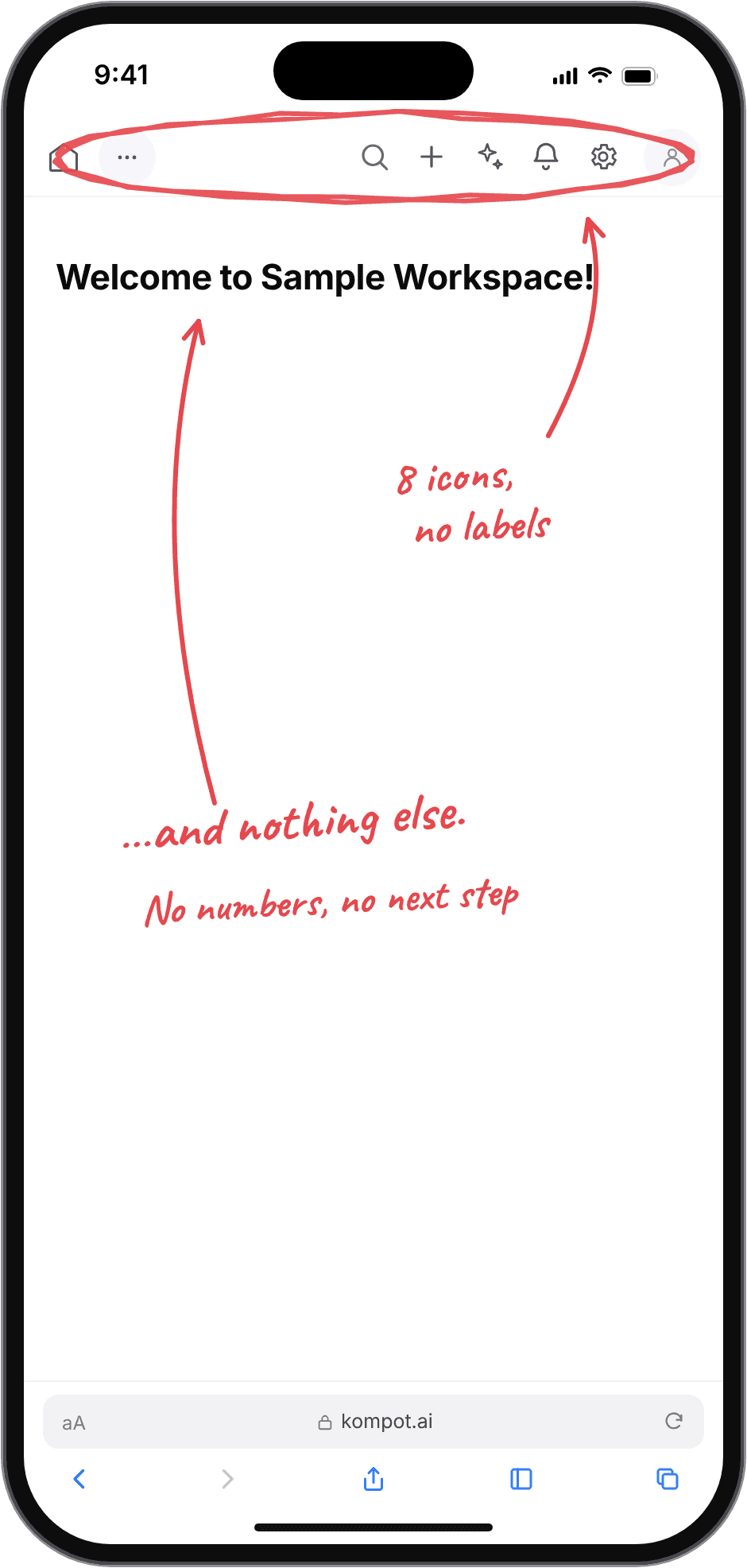
Mobile dashboard before the redesign, annotated: eight unlabelled icons in the top bar and a greeting with nothing under it
Dashboard
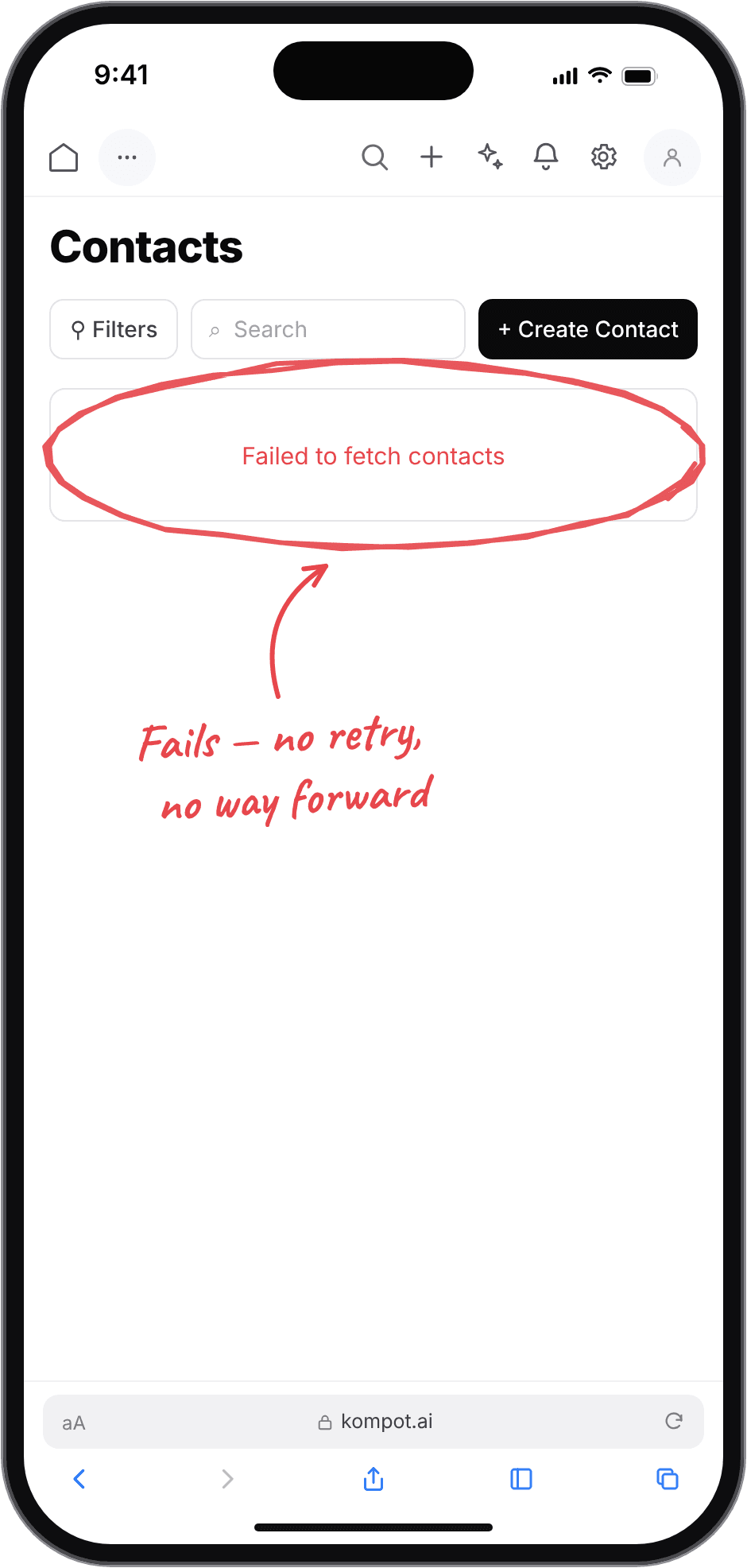
Mobile contacts page before the redesign, annotated: the list fails with no retry and no way forward
Contacts
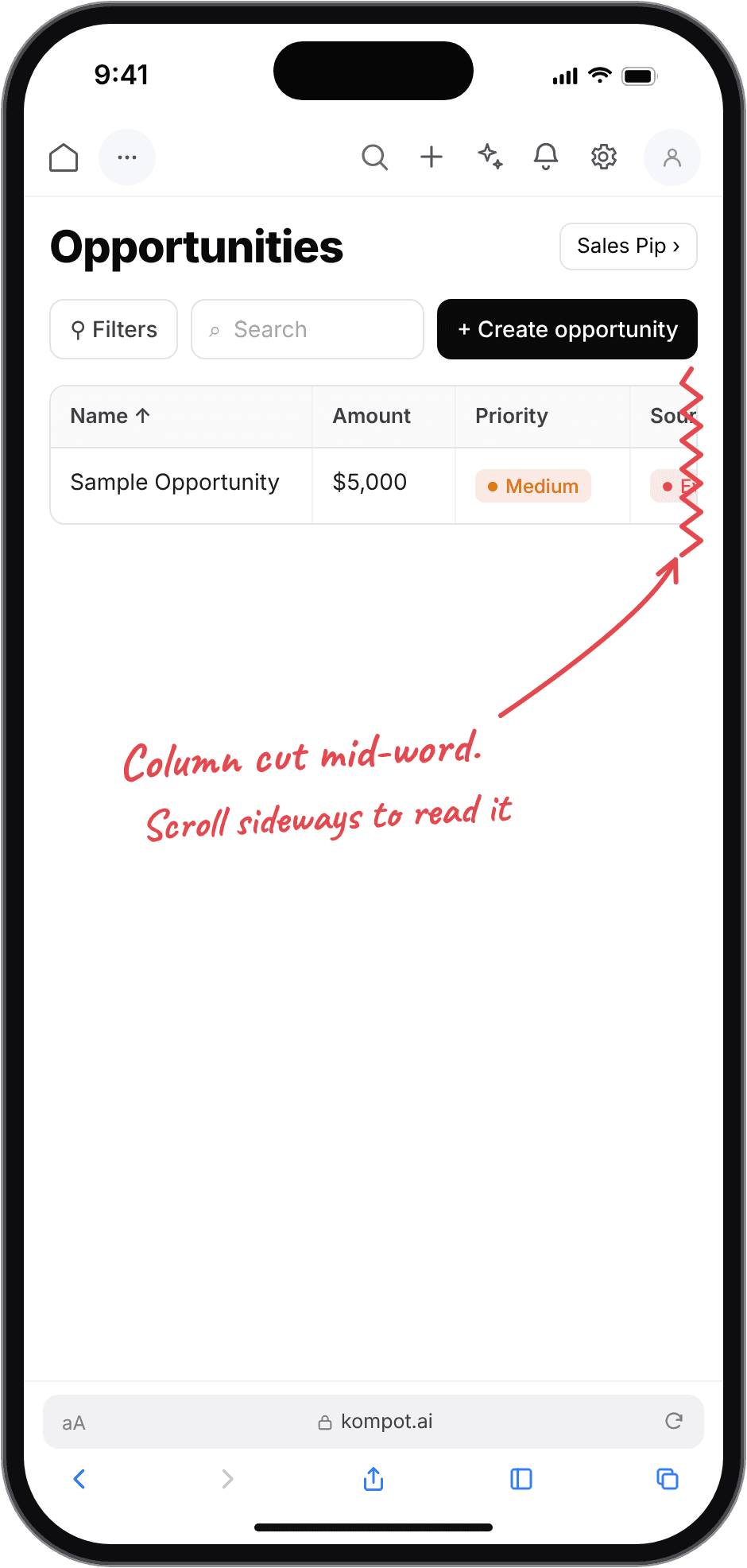
Mobile opportunities page before the redesign, annotated: the desktop table is cut mid-word at the right edge
Opportunities
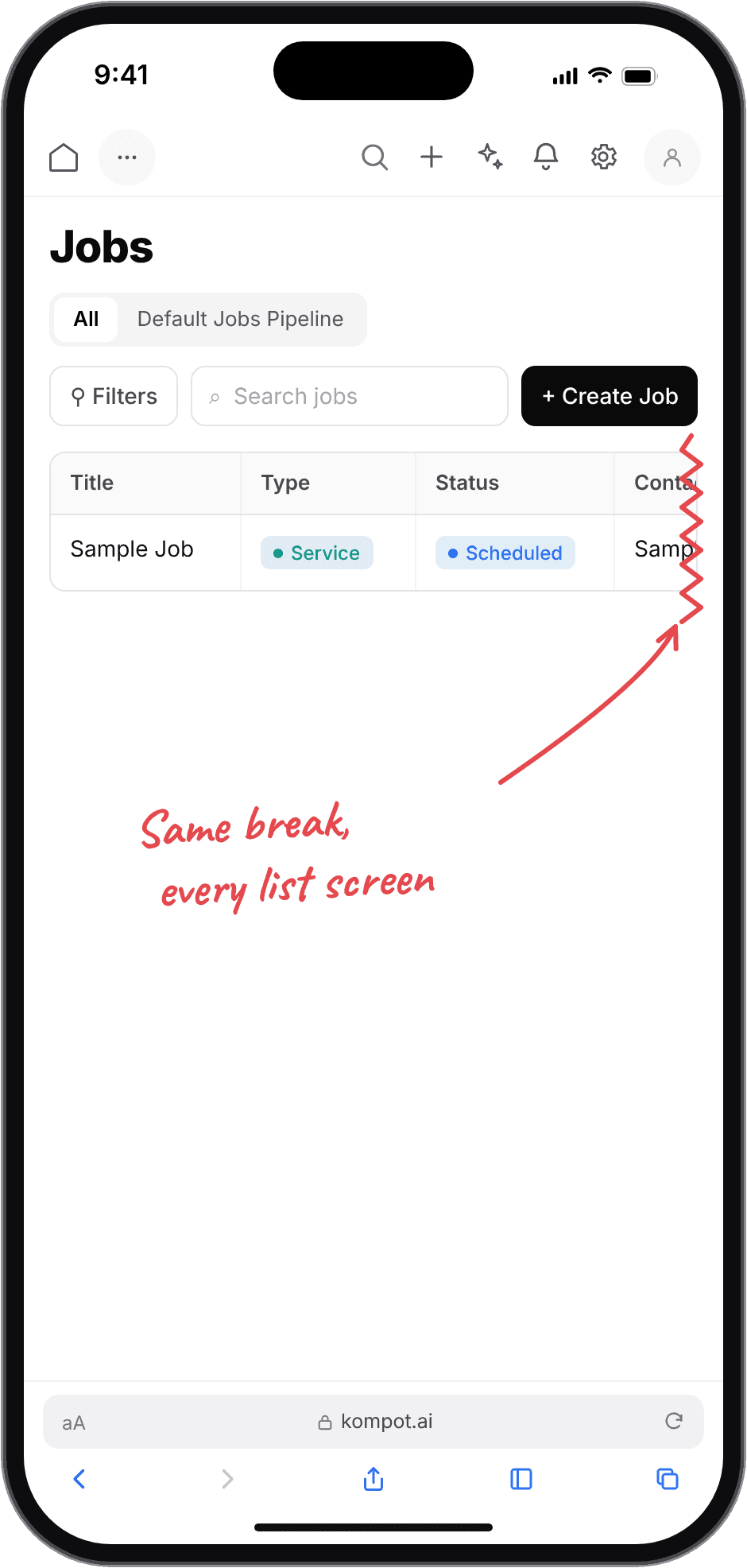
Mobile jobs page before the redesign, annotated: the same break on every list screen
Jobs

Redrawn 1:1 from staging captures, June 2026 · annotations mine.

quality assurance
23 findings, each one a report someone could act on
I tested the product end to end, desktop and mobile, and filed every finding as its own report: repro steps, screenshots, expected behavior. That format is the point. A finding written that way can be assigned, argued with and verified by anyone on the team, and it is the reason a designer who had just arrived could get fixes scheduled.
Desktop
Mobile
What this meant for the design
One cause produced both mobile findings, and it would keep producing more.
Every screen holding a list had the same problem waiting inside it. That is why the mobile version became a separate piece of work rather than a set of patches.

quality assurance

How a finding became a fix

The loop every one of the reports went through. A closed issue means a verified fix, not a merged branch — and the re-test step is the reason the mobile findings could be argued as a pattern rather than three separate bugs.

01
Found
Screen-by-screen pass, desktop + mobile.
02
Filed
Repro steps, screenshot, expected.
03
Fixed
By me in code or by a developer.
04
Re-tested
Desktop and mobile.
05
Closed
Verified fix, not a merged branch.
quality assurance · evidence
The reports, as filed
Mobile
Account
Data
Telephony
AI
IA
11 of 23 reports

quality assurance · evidence

Original tracker view

A crop of the team's tracker: ten of the reports I filed, closed between June and July 2026. Nothing inside the screenshot is edited.

Diagram from the case study

the reframe

The mobile version had to stop being a view of the desktop database and start being the answers the owner needs away from a desk.

↺ PATTERN MAP

Before
01 · Layout
The desktop table
Every column, at any width
02 · On a phone
Clipped at the viewport edge
The column carrying the amount is the one cut
03 · Only way out
Scroll the table sideways
Not discoverable on a phone
04 · Result
The record cannot be read
On two of the four screens I captured

desktop → mobile

One decision per pattern, applied to every screen

Ten desktop patterns and what each one became on a phone. The map was settled once and then applied, which is why eleven screens could be designed without eleven separate arguments — and why the two screens that never adopted it are so easy to spot.

Lists and tables
01 · Data table
Stacked cards
Contacts · Opportunities · Jobs · Invoices · Tasks · Products
02 · Table columns
Label–value rows inside the card
Jobs: contact, address, start, end
03 · Hover row actions
Persistent buttons on the card
Every list card
Controls
04 · Filter dropdowns
A horizontally scrollable chip row
Invoices: 7 statuses · Tasks: 4 plus 2 quick filters
05 · Pipeline switcher
Segmented control
Opportunities · Jobs
06 · Modal dialog
Full-height sheet, one column
Primary action pinned where the thumb is
Navigation and views
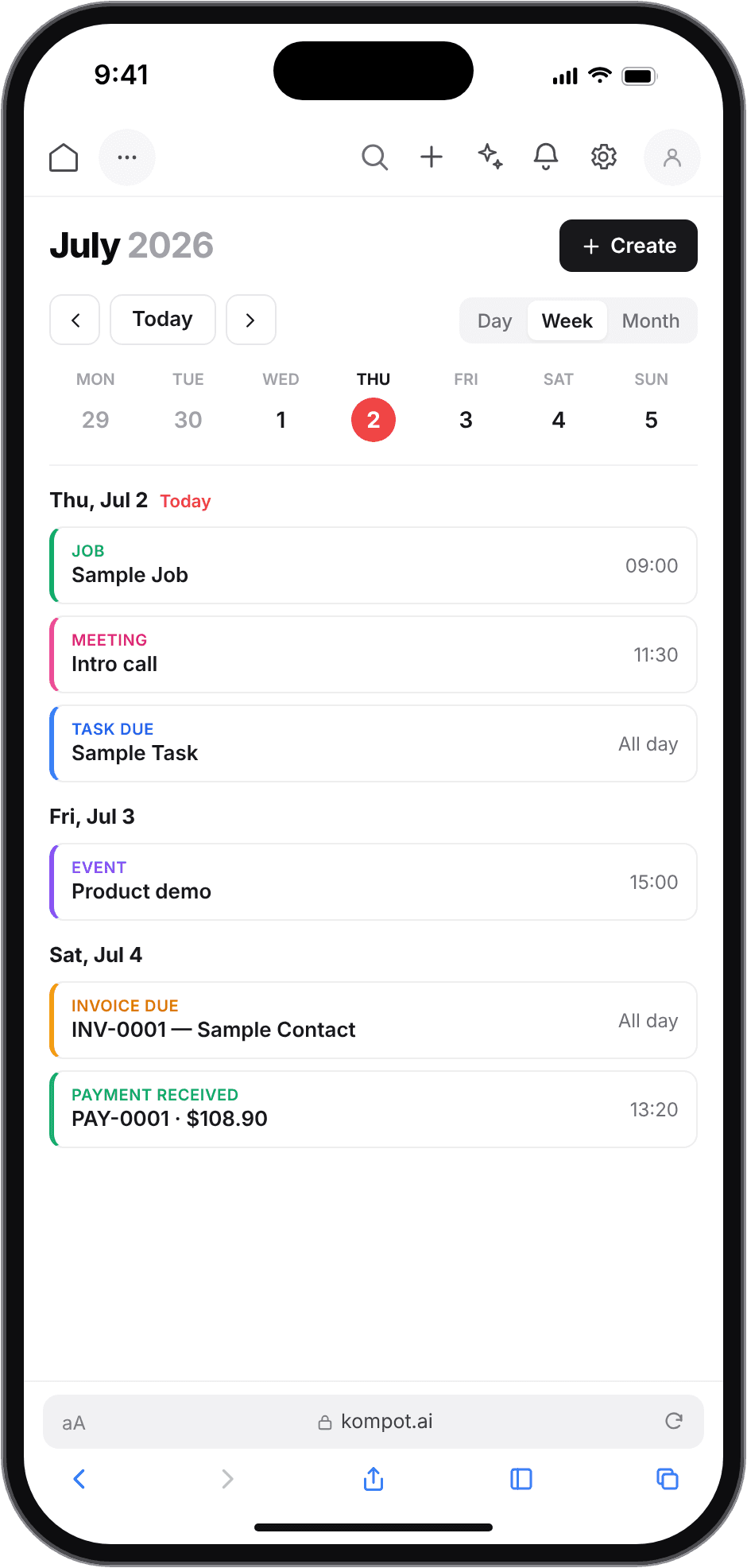
07 · Month calendar grid
Week strip and an agenda
Grouped by day
08 · Split-view inbox
List screen, then conversation
With a back arrow
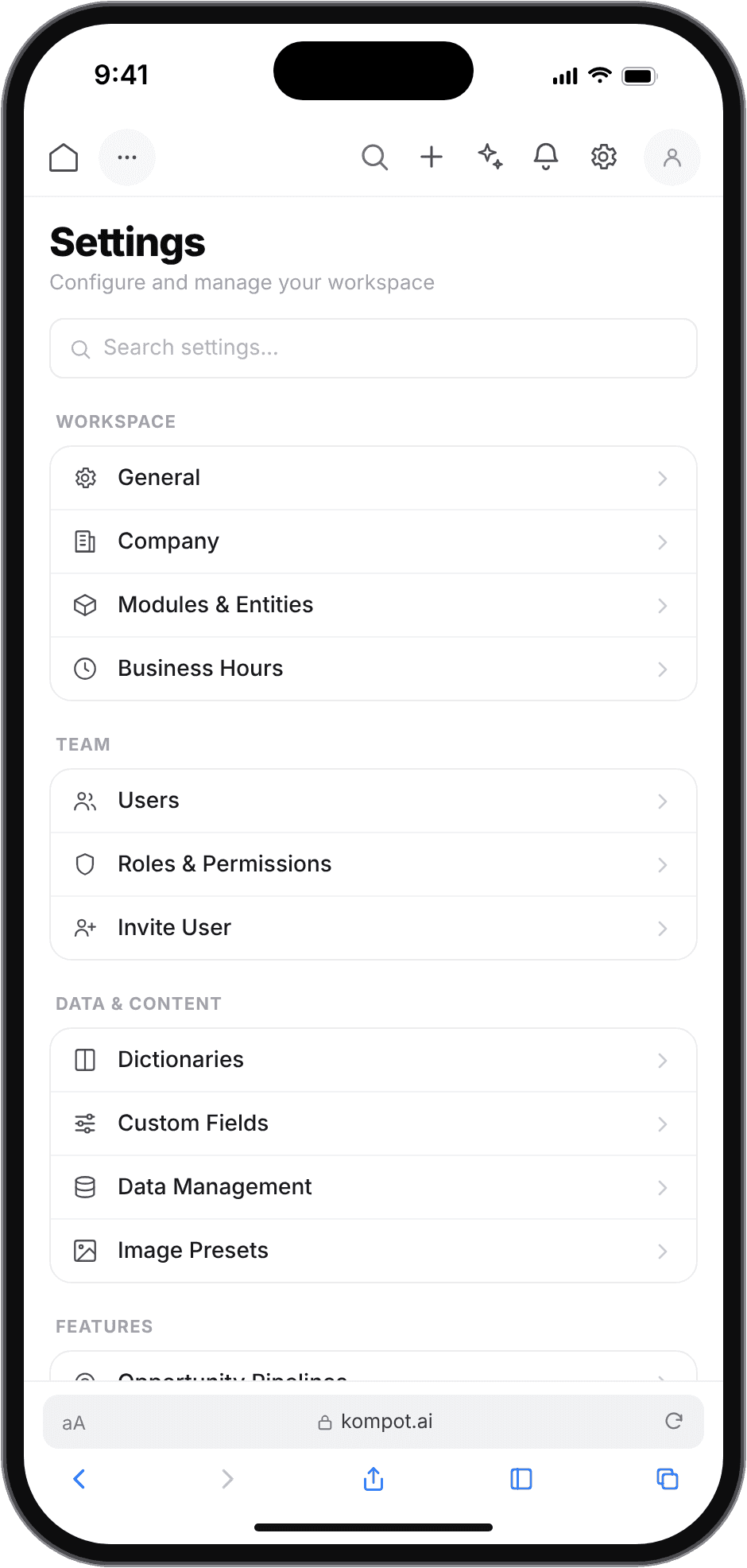
09 · Settings in one column
41 rows in 7 labelled groups
Searchable
Carried over
10 · Status color chips
Kept unchanged
Everywhere — the one carry-over

design principles

Four rules the phone screens have to keep

01
One object per card, never a row of columns
A phone has one column. Anything that was a table row becomes a card with a title, a status, and label–value pairs that wrap instead of truncating.
02
The screen opens with the thing to act on
This gets opened away from a desk. Today's count, the overdue flag, the unpaid total — not a greeting and not a toolbar.
03
Nothing hides behind hover
Row actions, tooltips and hover states do not exist on a phone. Every action is a visible target, or it is not in the design.
04
Filters are visible, not buried
Status and category filters become a scrollable chip row inside the content, so the current filter is readable at a glance.

inside the product

Before / after

Four pairs at the same crop: the staging capture on the left, what replaced it on the right. Pairs 01–03 show the screen as it shipped; pair 04 shows the design. Each pair names the principle it applies.
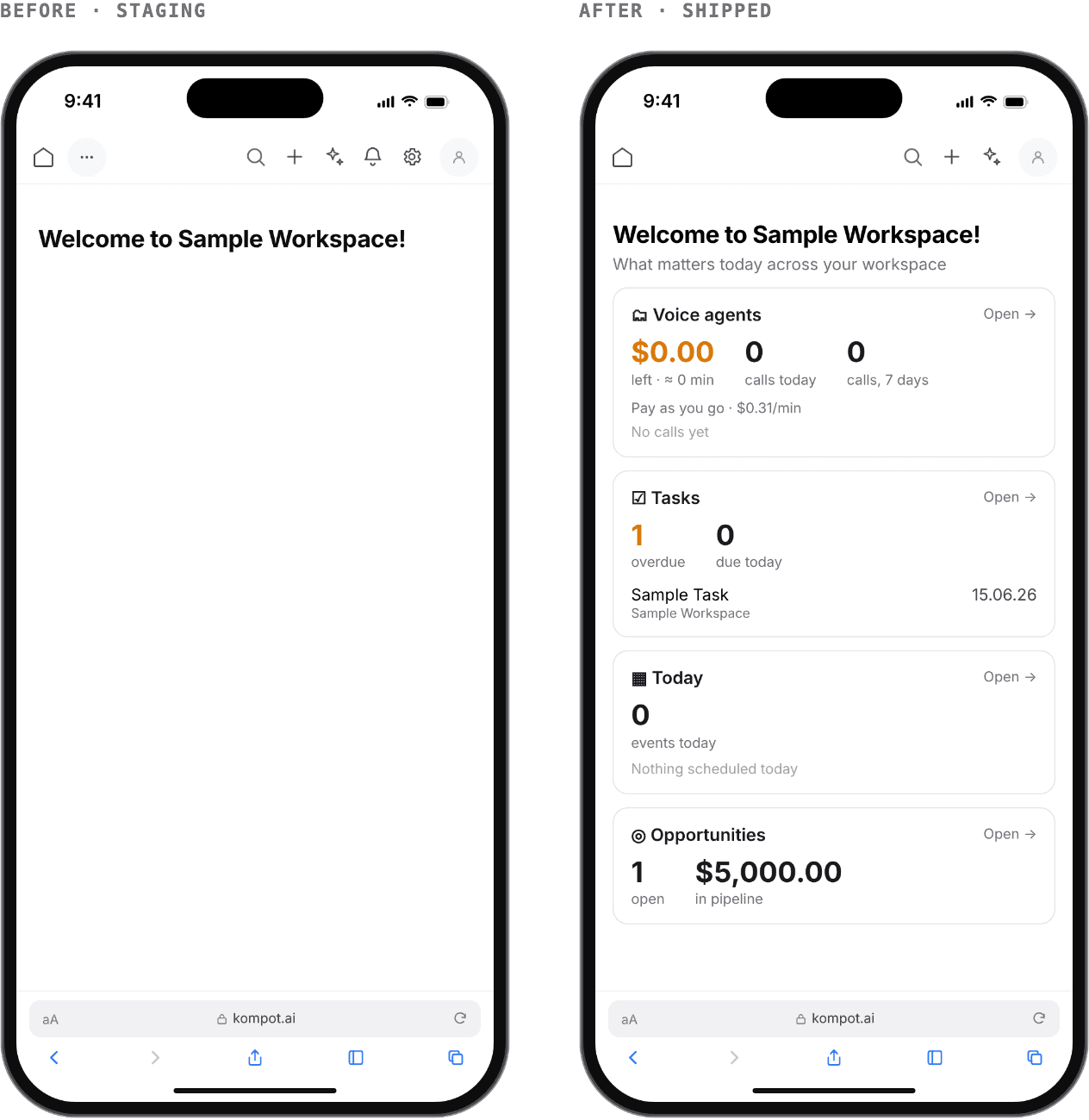
01 · Dashboard
The greeting became the five things that need you today
The decision
Replace the greeting with summary counters, quick actions, today's schedule and recent activity.
Why it matters
The first screen now answers “what needs me today” in one glance instead of confirming who is logged in. Open opportunities, upcoming jobs, pending tasks, unpaid invoices and today's events, each a tappable card.
What you see
Applies principle 02 — the screen opens with the thing to act on. After: shipped. Top bar: 8 icon-only actions → 5.
Before and after of the mobile dashboard: an empty greeting, then a screen of summary cards
02 · Contacts
A failure with no next step became a readable record
The decision
Turn the table into contact cards: avatar, name, source and type tags, phone, email, owner and date.
Why it matters
The whole record is readable without a single sideways scroll, and the list no longer fails into a dead end — there was no error or empty-state design at all. The actions sit on the card instead of appearing on hover.
What you see
Applies principles 01 and 03 — one object per card, and nothing hides behind hover. After: shipped.
Before and after of the mobile contact list: a failed fetch, then two complete contact cards
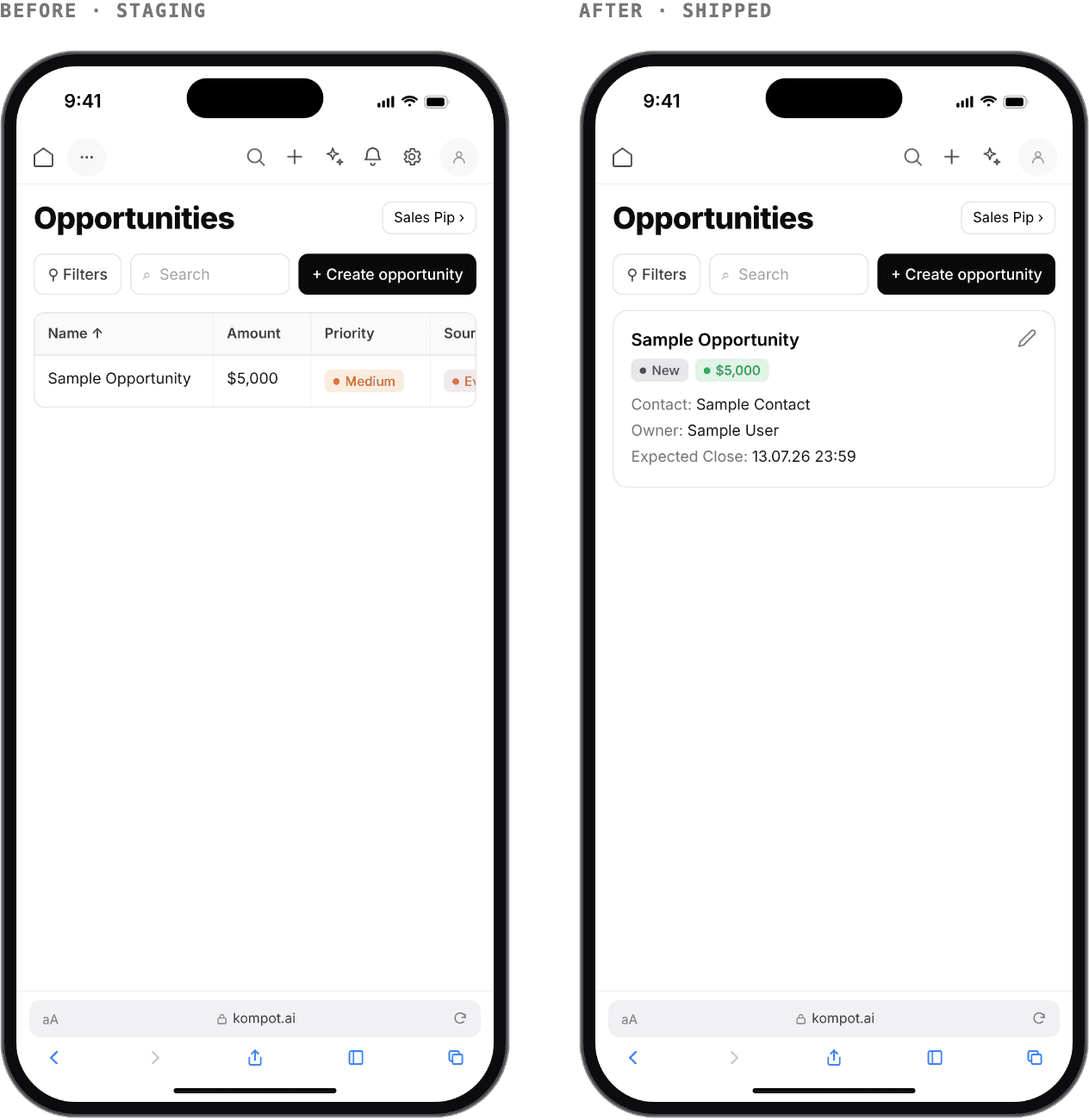
03 · Opportunities
The column that was cut off is the one carrying the money
The decision
Cards with the amount as the largest element, a segmented control for the pipeline, and tags for stage and source.
Why it matters
In the desktop table at phone width the fourth column was clipped at the viewport edge — and the fourth column is the amount. Amount, stage, contact, owner and expected close now sit on one card with nothing truncated.
What you see
Applies principles 01 and 04 — one object per card, and filters that stay visible. After: shipped.
Before and after of the mobile opportunities list: a clipped desktop table, then a card with the amount
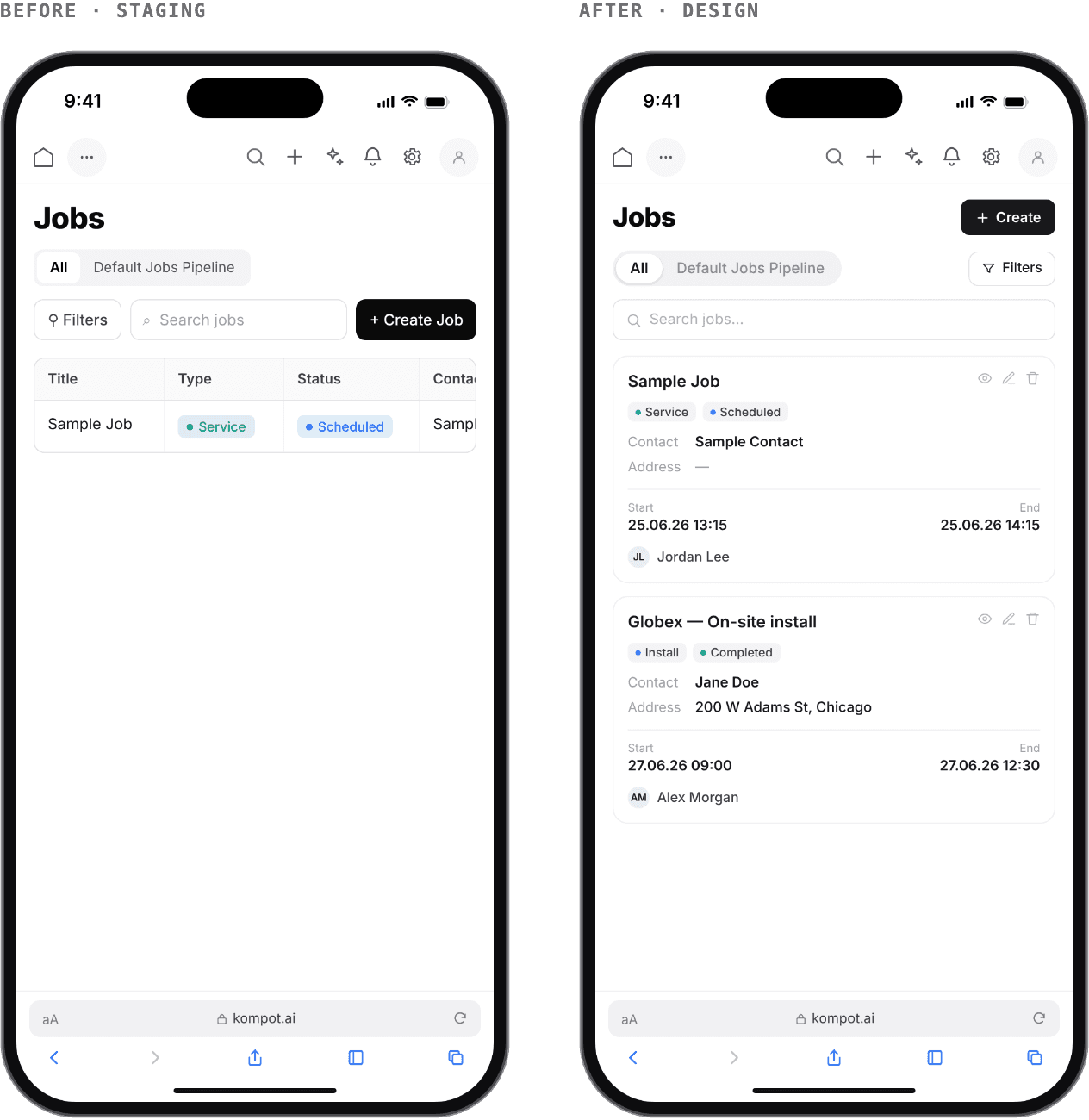
04 · Jobs
Every field of the job, readable on site
The decision
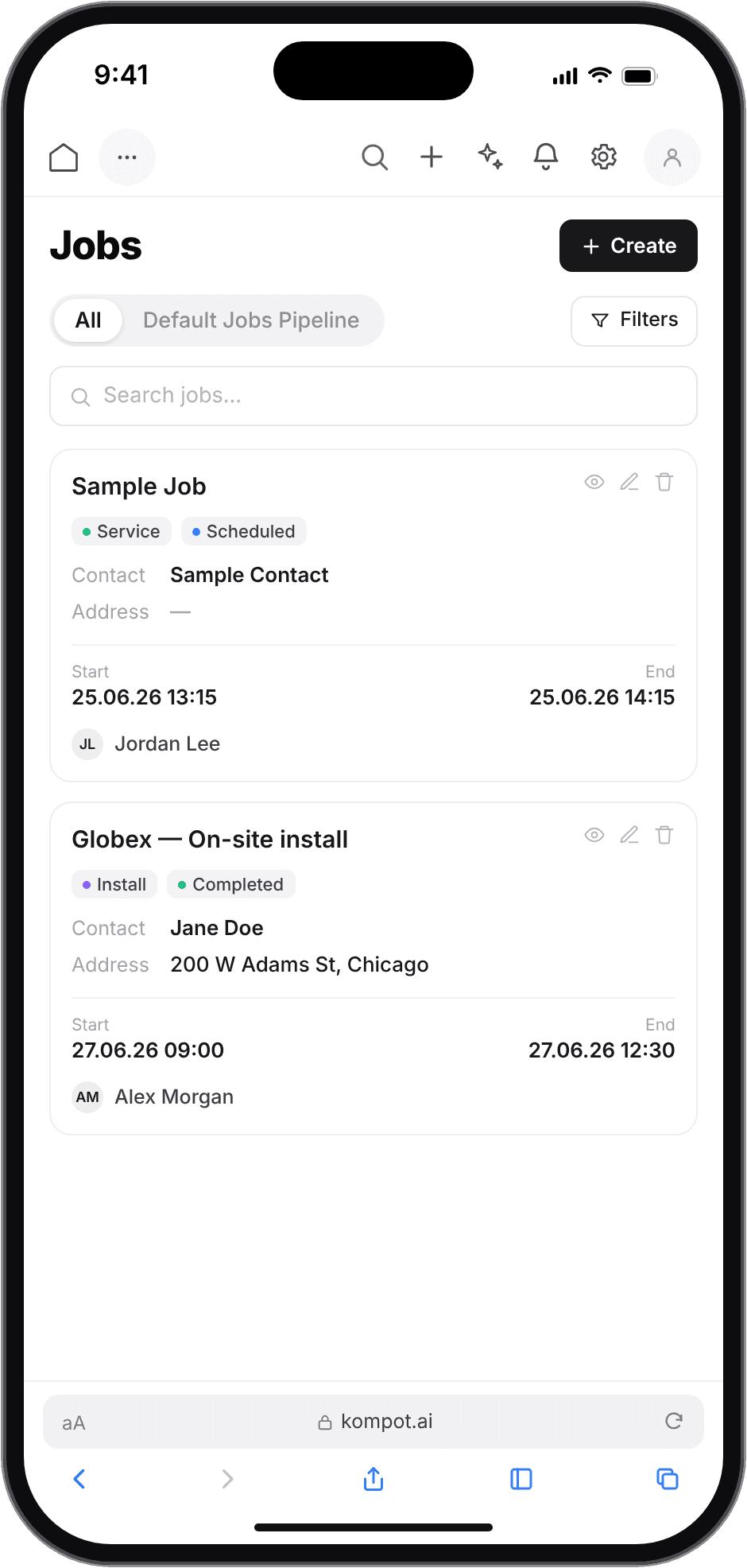
Each job becomes a card: type and status tags, contact, address, start and end on two lines.
Why it matters
The desktop table clipped the fourth column; the card keeps every field readable.
What you see
Applies principles 01 and 04. After: design.
Before and after of the mobile jobs list: a clipped desktop table, then a job card with every field

mobile

Design · 11 mobile screens

The full set I designed, in the order a new owner meets them. These are the design mockups; the production screenshots elsewhere on this page are labelled Shipped.
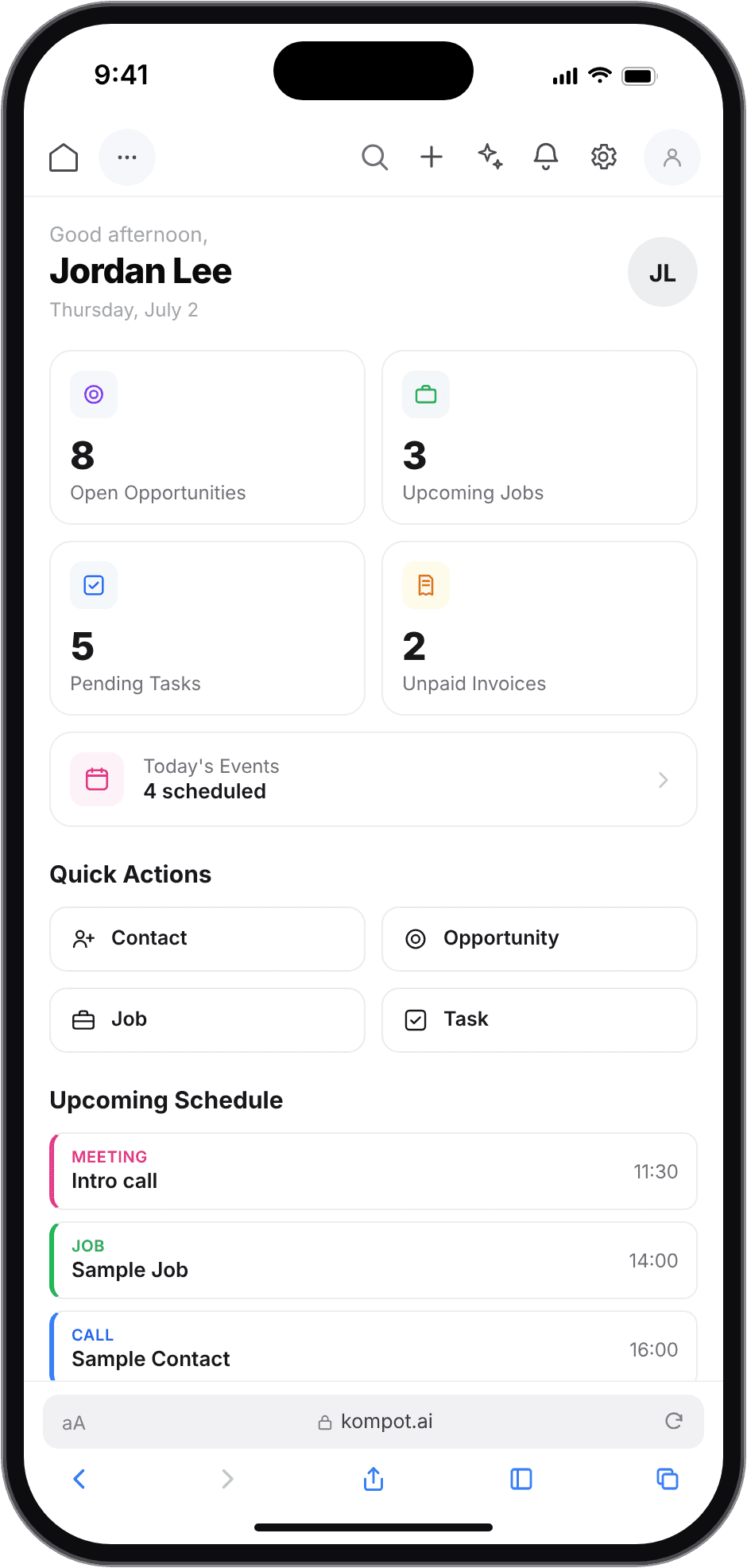
Mobile design mockup — Home
Home
Mobile design mockup — Contacts
Contacts
Mobile design mockup — Opportunities
Opportunities
Mobile design mockup — Jobs
Jobs
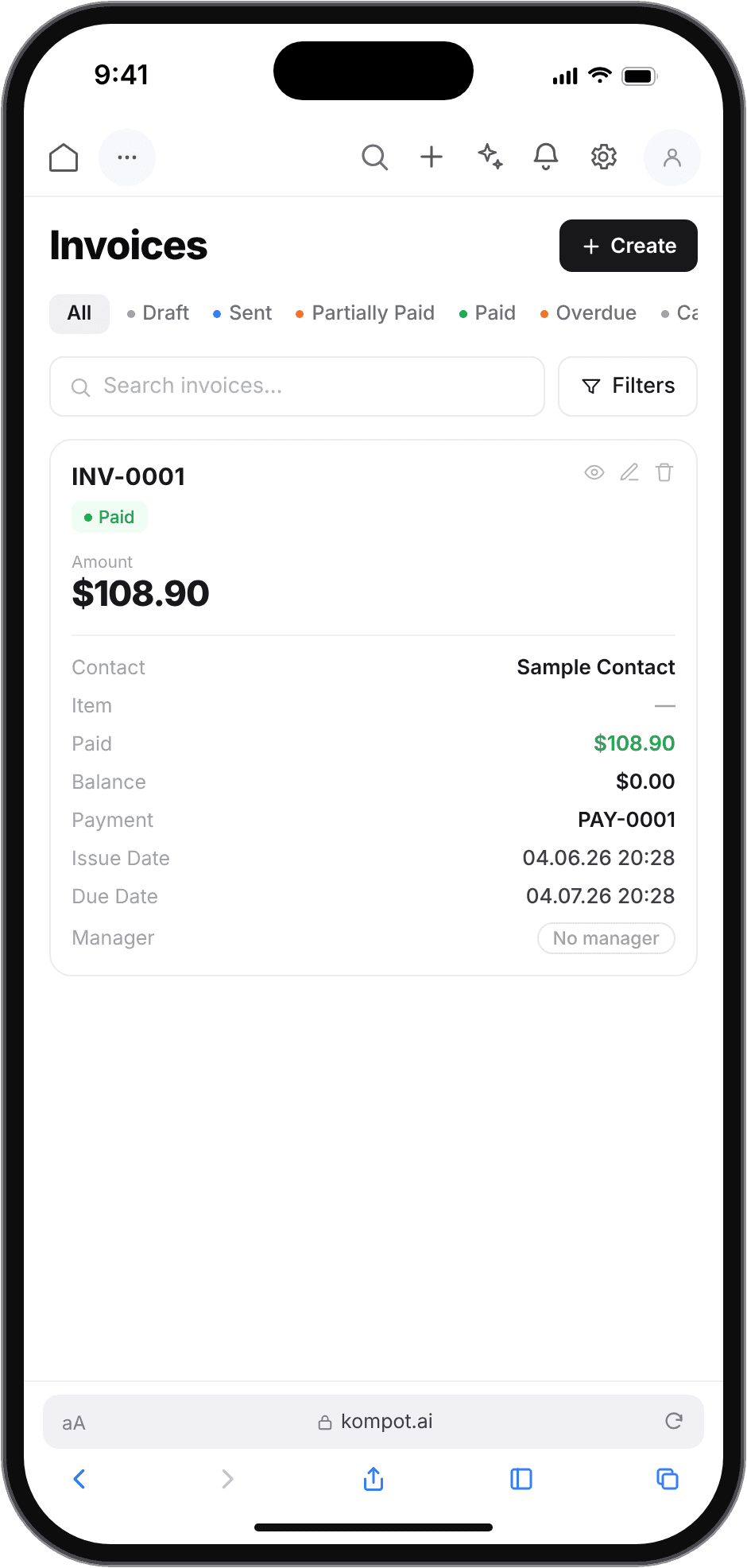
Mobile design mockup — Invoices
Invoices
Mobile design mockup — Tasks
Tasks
Mobile design mockup — Calendar
Calendar
Mobile design mockup — Products
Products
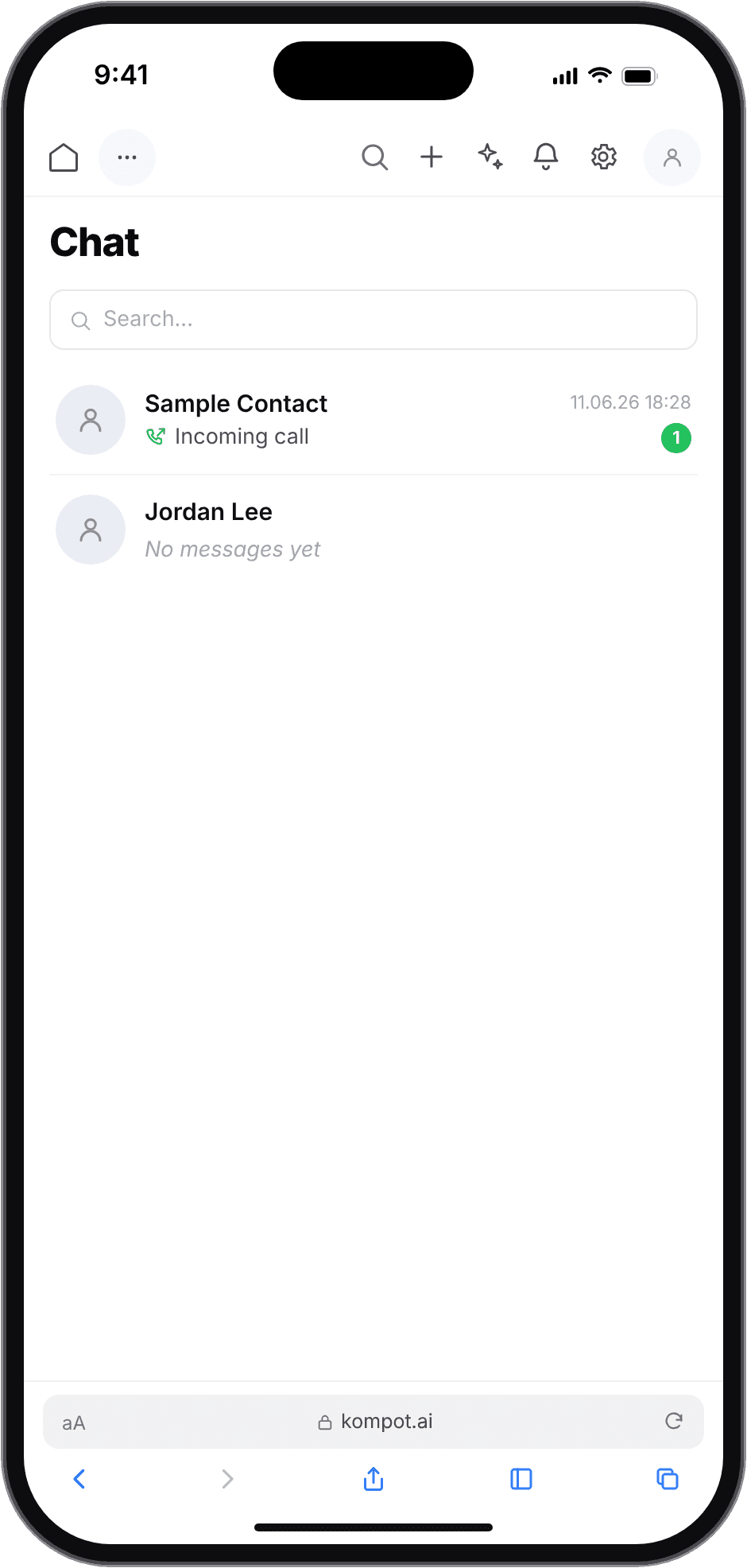
Mobile design mockup — Chat
Chat
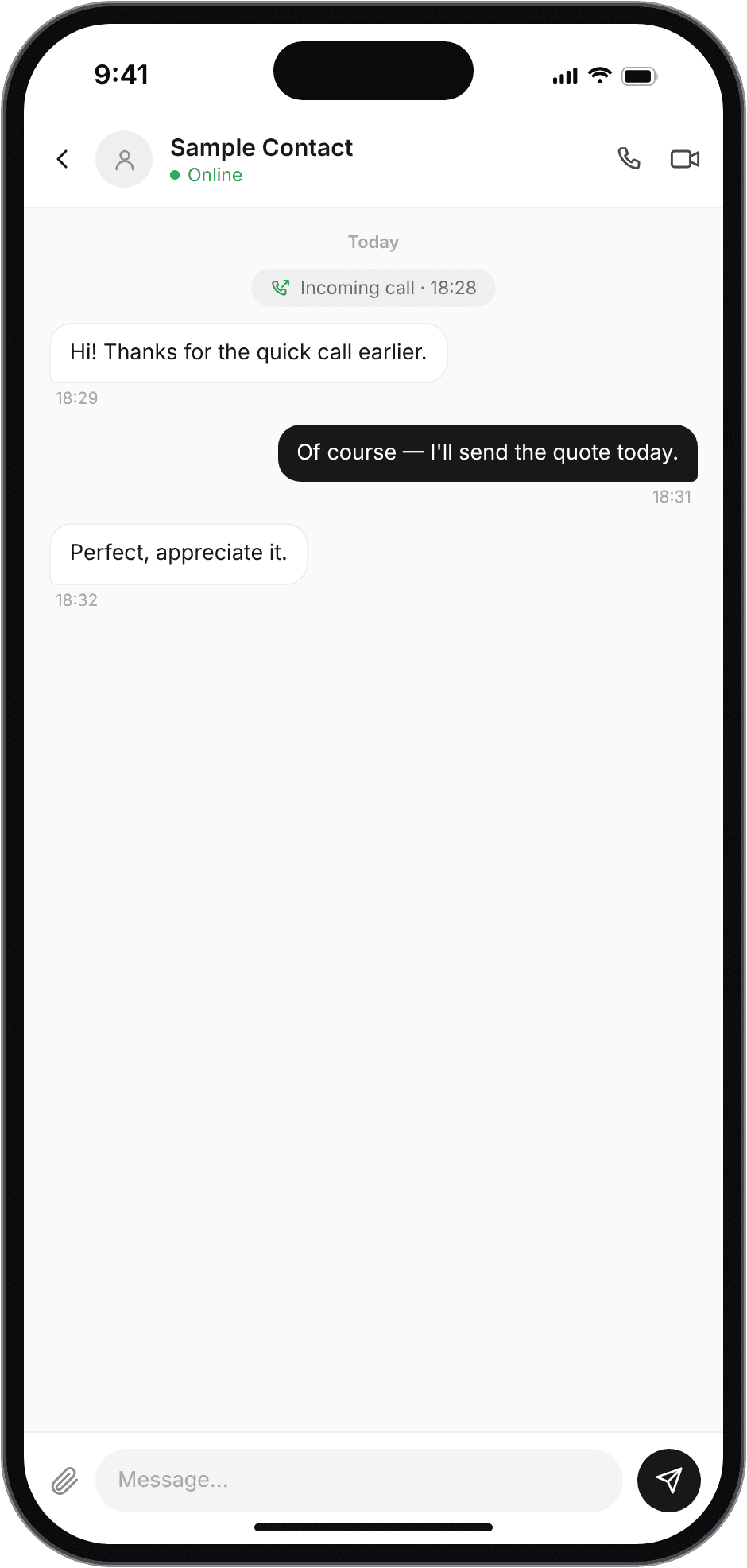
Mobile design mockup — Conversation
Conversation
Mobile design mockup — Settings
Settings

Kompot.ai · public pre-release site

The product, live

The kompot.ai landing page as a logged-out visitor sees it, in a desktop browser
Live pre-release build · sign up to click through

iteration

Post-release audit · October 2026

Why it matters
Post-release proposal
01
AI representative · the default setup does not disclose that the agent is an AI
In the US market that is a legal and reputational exposure, not a copy problem.
Make disclosure the default behavior: the agent introduces itself as the company's AI assistant.
02
AI representative · it cannot be switched on at all
Save stays disabled until a “credential” is chosen, with no explanation of what that is or where to get one. The feature the product is bought for is unreachable on day one.
Use the platform's built-in model by default, credentials optional, and explain every disabled control.
03
Digital employees · six of seven sit behind a padlock
No reason is given and no route to unlock. A silent block reads as a broken product, not as a paid tier.
Label the lock — “Available on Pro”, “Coming soon” — and give it an action.
04
Customer card · lifetime value shows $0 next to a paid invoice
The number a business owner trusts least is the one that contradicts the screen beside it.
Re-check the formula and expose it in a tooltip.

trade-offs

Next improvements, ranked

Make AI disclosure the default
Why
Not disclosing is a legal and reputational risk in the US market, and it is the direction the competitors are being pushed in.
A wizard that launches the AI receptionist in five minutes
Why
Channel → knowledge base → tone → test call → on, with the built-in model by default and no credential step.
A launch checklist on the home screen instead of empty widgets
Why
Lead the new owner to the first real value: the first AI answer to a real customer, and the first paid invoice.
Explain every “no”
Why
Padlocks, disabled buttons and empty screens have to state the reason and the next step.
Move the AI employees and chat into the main navigation — and translate them
Why
The product's advantage is that the agent lives inside the CRM. Today it lives inside Settings.

outcome

What shipped, and what is still the old table

In production
 
0
Mobile screens designed from scratch
0
Shared components behind them
0
Bug reports filed in a two-week sprint
0
Issues found in the post-release audit
The dashboard, contacts, opportunities and the record forms are live in the shipped pattern: cards instead of tables, a filter and search row sized for a thumb, and a create button always within reach.
Not yet in production
 
0
Designed screens still rendering the desktop table
—
Adoption and usage — not measured
Invoices and tasks still render the desktop table in production, clipped at the same edge as before. I am showing them that way rather than claiming the whole redesign shipped: the pattern is proven on the screens that adopted it, and the ones that have not are the clearest argument for finishing the rollout.

reflection

What I would carry into the next product

Testing the whole product was the fastest way to earn the right to redesign part of it
Nobody hands a mobile redesign to the person who just arrived. A tracker full of reproducible issues, each with the expected behavior written down, made the case on its own.
Mobile is a decision about what to drop, not about what to resize
The desktop table held every column because it could. The card holds four, because four is what gets read on a phone away from a desk.
An audit after release is a different instrument than research before it
It cannot tell you what to build; it can tell you, with evidence, what is already costing you. That is why it is dated and kept separate from the work that shipped.

in one line

I arrived to test a finished product and left it with a phone version of its own.

destinations

Next case study: ModelOps
Pre-release build · may change. Built at DigitalVertex for a client; the product has not launched publicly yet.

CONNECT

BASED IN

San Francisco · remote · open to relocation

LOOKING FOR

Senior Product Designer · AI Product Designer · UX/UI

© 2026 LIIA ARSLANOVA